Freestyle ASMR Makeup Artist: How to Play
A practical walkthrough written for this specific game.
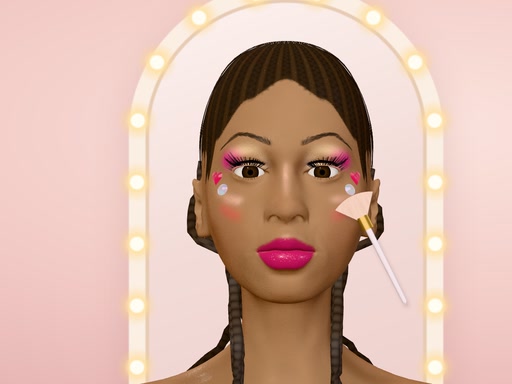
Freestyle ASMR Makeup Artist is a creative 3D beauty studio built around freehand control rather than fixed templates. Each client arrives with a different face shape, skin tone, hairstyle, natural hair colour, and outfit, giving every session a slightly different starting point. You decide whether the final look should be subtle, theatrical, colourful, or completely experimental. There is no beauty score to chase and no single correct result.
Begin with a clear idea
Before applying a product, take a moment to study the client’s features and outfit. A simple plan makes the tools easier to combine. You might choose one main colour for the eyes, a related lip shade, and a small highlight that connects the two. If you prefer to experiment, begin with a light application so later layers can still change the direction of the design.
Using brushes and colour
Select a brush or makeup tool, choose a colour, then press and drag directly across the face. Slow movements help create controlled edges, while broader strokes cover an area more quickly. Eye shadow and highlighter usually look more balanced when they are built gradually. Apply a small amount, review both sides of the face, and add another pass only where it improves the look.
Eyeliner and mascara benefit from shorter movements. Trying to draw an entire line in one fast gesture can produce an uneven result. Work from one section to the next and use the rewind option if the last action does not fit the design. Rewind removes recent work without forcing you to restart the whole client.
Lips, lenses, and face gems
Lip colour can become the centre of the look or support stronger eye makeup. Compare the shade with the outfit before committing. Contact lenses change the eyes instantly, making them useful for fantasy designs or a strong colour contrast. Face gems are placed with a click rather than painted. Use them as deliberate accents around the eyes or cheeks instead of filling every open space.
A practical creative routine
- Study the client and choose a simple colour direction.
- Apply broad products such as shadow or highlight first.
- Add precise liner, mascara, and lip details afterward.
- Check the whole face regularly instead of focusing on one small area.
- Use rewind immediately when a stroke creates a distracting shape.
- Finish with gems or lenses only if they strengthen the completed look.
Playing with sound and touch
The ASMR-inspired sounds make brush movements and selections feel more tactile. Keep the volume comfortable, especially during longer sessions. The game supports mouse, pen, and touchscreen input in portrait or landscape orientation. A pen can provide precise lines, while touch works well for broad applications. On a mouse, slower dragging usually gives the most predictable result.
Frequently asked questions
Can I create a look without following a template?
Yes. The game is designed for freehand makeup and does not require a preset pattern or beauty score.
How do I correct a mistake?
Use rewind to remove the latest action. Correct small problems early so you do not need to undo several good steps.
When is a design finished?
Press the green check when the colours and details feel balanced. Review the result, then use the arrow to meet the next generated client.
Freestyle ASMR Makeup Artist works best as an open creative space. Build the design in layers, compare details with the complete face, and allow each new client to inspire a different approach.
Quick controls
Choose a tool and colour with the mouse, pen, or touchscreen, then press and drag on the face. Click to place gems or change contact lenses. Use rewind to remove the latest action, the green check to finish, and the arrow to continue.